Mandala · macOS 14 or later · beta-1
A break you can watch being made.
Mandala is a menu-bar timer for macOS. Every twenty minutes it has you look away for twenty seconds — and once an hour it takes the screen for three, and fills it with a line mandala being drawn one stroke at a time. Nothing to read. Nothing to click. Your eyes refocus, your shoulders drop, and your desk is exactly where you left it.
no card · nothing to cancel · one-time purchase
The screen becomes paper.
Everything you were doing fades out. What replaces it isn’t a wallpaper or a countdown — it’s a drawing that starts from nothing, in front of you.
No timer to stare at.
The mandala’s own progress tells you how much break is left. You learn to read it in a day, then you stop checking.
Then the last stroke lands.
Your desktop comes back exactly as you left it. Three minutes. No summary, no streak popup, no congratulations.
That was one break.
You don’t have to think about a single one.
a 20-second look away every 20 minutes on the hour, the mandala — three minutes an 8-hour day draws about 8 of them
04 — Ink
Twelve drawings, ten inks.
Every long break gets a drawing you haven’t seen, in whichever ink came up — same rules, different result. Every ink is a pair: a luminous version for dark breaks, a deep one for paper. Pick one, or let Mandala choose.
+ random per drawing · multicolor hover, tap or focus a swatch to re-ink the drawing
05 — Smart pause
It waits for you to stop talking.
A break never lands mid-sentence. Out of the box Mandala holds through calls, fullscreen apps and Focus modes. In Settings you can turn on three more — a playing video, screen sharing or recording, anything on your calendar — and name the apps that must never be interrupted.
- on a call10:20 → 10:47
- fullscreen app11:40 → 12:06
- focus mode14:00 → 14:23
- sharing your screen15:40 → 16:04
Sample day · not your data
06 — Screen Score
A number only you can see.
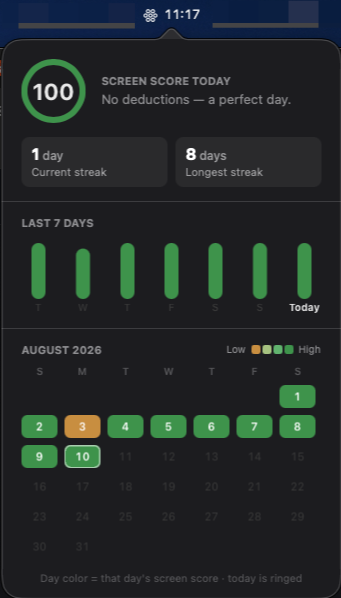
Mandala scores your day out of 100 for taking breaks and keeping sessions sane, keeps a streak for showing up, and holds a month of history. Computed on your Mac, stored on your Mac, exportable as a CSV you own.
| measure | value |
|---|---|
| screen score today | 100 |
| current streak | 1 d |
| longest streak | 8 d |
| history kept | 30 d |
| export | CSV |
From the app · 10 Aug 2026
app-stats.png · 341 × 598
07 — Gallery
Every drawing, kept.
Every finished mandala is saved. Not a log of what you got done — a record of the times you looked away. One click sets the latest one as your wallpaper.
08 — Enforcement
As gentle or as firm as you need.
Skip is there the whole time. A nudge, never a wall.
Skip appears after fifteen seconds. Long enough that resting is the easier option.
There is no skip. The break runs its course. You asked for it.
skip available · 0 s · default
skip after · 15 s
skip disabled
Your breaks, your drawings, your numbers: all of it is computed on your Mac and stays there. The account you create for the trial holds your license — never how you work.
Leaves your Mac: licensing — your trial, your activation and a fortnightly recheck — plus one request asking whether a newer build exists, and an issue report, but only when you write one.
That is the entire list for the app. This website counts visits, and the privacy page says what it records.
Take the next one.
7-day trial · no card · macOS 14 or later · one-time purchase, not a subscription